Find Your Ideal Font with One Click
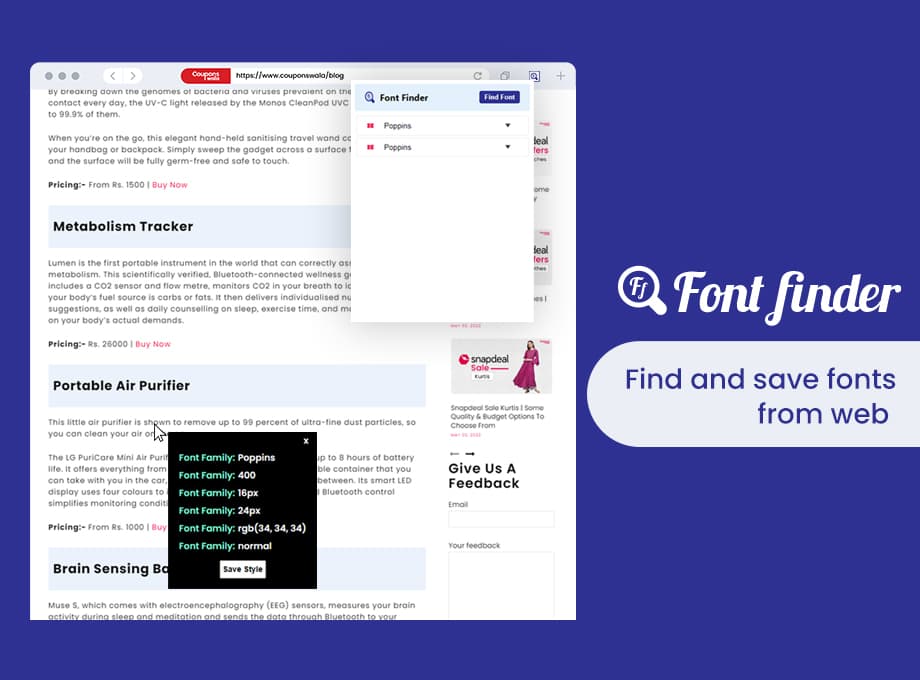
Font Finder is a free Chrome extension that instantly identifies the font family, size, weight, color, style, and line height of any text on any website. Built for designers and developers.
Key Features
Everything you need to identify and inspect fonts on any website, all in one lightweight extension.
How It Works
Identifying fonts takes just three simple steps.
Install the Extension
Add Font Finder to Chrome in one click from the Chrome Web Store. It works on all Chromium browsers.
Hover Over Any Text
Activate the extension and move your cursor over any text element on any website.
Copy Font Details
Instantly see the font family, size, weight, color, style, and line height. Copy with one click.
Loved by Designers & Developers
See what our users have to say about Font Finder.
Why Font Finder?
See how Font Finder compares to other popular font identification tools.
| Feature | Font Finder | WhatFont | Fonts Ninja |
|---|---|---|---|
| Font Color (HEX & RGB) | |||
| Line Height | |||
| 100% Free | |||
| Lightweight |
Frequently Asked Questions
Everything you need to know about Font Finder.
Ready to Identify Any Font?
Join thousands of designers and developers who use Font Finder every day. Free forever, no account required.